How to Create English Listening Practice Audio on iPhone
Before a trip, you may want to hear how a hotel conversation could sound. For a lesson, you may need a short exchange built around a few useful expressions. For a language-learning page, you may want an episode your audience can listen to and work through.
Tau34 AI Video & Voice Studio lets you create that conversation on iPhone: prepare a script, choose two AI voices and generate dialogue audio. You can use the recording for your own listening practice, a teacher-led activity or a series of language-learning posts.
Our real example is a hotel conversation. A guest arrives before check-in and asks to leave some bags. The screen recording uses the same eight lines shown in this guide.
Start with one situation and a few useful phrases
A short listening activity works well with a clear task: find out when check-in starts and where the guest can leave the bags.
That gives the speakers a reason to talk and puts useful expressions in context:
- Check in — register your arrival at a hotel.
- Leave my bags — ask to keep your luggage somewhere while you are away.
- Come back — return to a place later.
You can build another conversation around buying a ticket, making an appointment, returning an item or planning a weekend. Each situation gives you a different passage to practise or share with learners.
Prepare the dialogue in AI Dialogue Writer
In Dialogue Studio, tap Write with AI in Dialogue Text. In AI Dialogue Writer, set Language or languages to English.
In Topic or idea, describe the speakers, the situation and the expressions you want to include. For example:
Write a short dialogue in simple English between a hotel guest and a receptionist. The guest arrives before check-in and asks to leave some bags. The receptionist explains that check-in starts at three and the bags can stay at the front desk. Write eight short turns. Include check in, leave my bags and come back.
Choose Short under Duration, then tap Create dialogue. Requests for simple language and eight turns belong in the topic description; they are instructions for the script, rather than separate English-level settings.
You can edit the script in Dialogue Text before generating the audio. AI-generated wording can vary. To reproduce our recorded example, use the exact hotel dialogue in the transcript below.
Use two voices for the guest and receptionist
In Speakers, choose a voice for Speaker A and another for Speaker B. For this example, Speaker A is the guest and Speaker B is the receptionist.
This example uses Customer Support in Quick Presets, one of Tau34’s 40 presets. The screen recording shows Autonoe for Speaker A and Puck for Speaker B. You can use these voices for the hotel conversation or choose other voices for your own example.
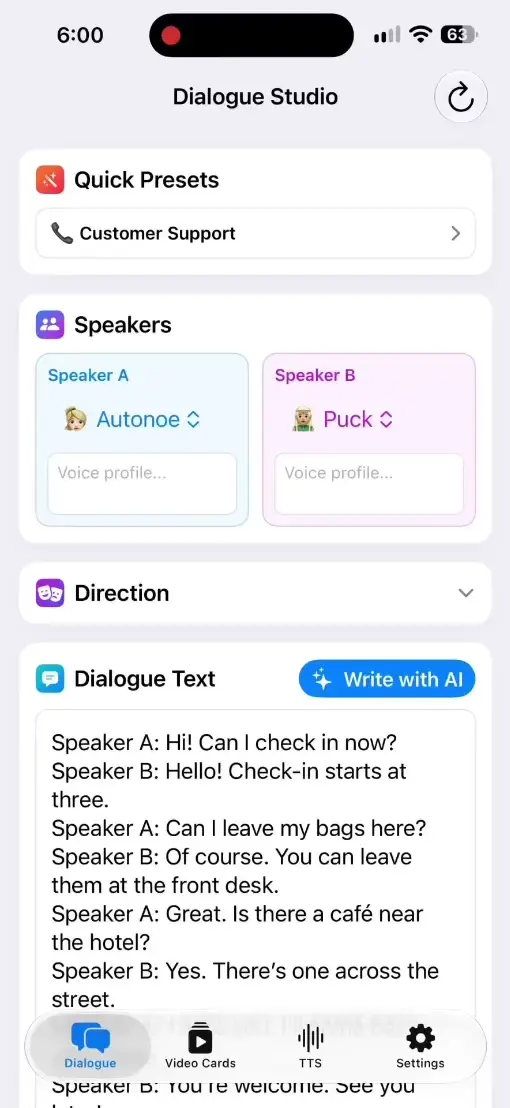
Tap Generate when your script and voices are ready. The finished audio appears in Result, with a player and Share / Download below it. Our recording shows the prepared text, selected settings and playback of the completed audio.
The full technical walkthrough is in our guide to creating a two-voice AI dialogue on iPhone. Here, we use that workflow to make a specific listening activity.
Watch the Tau34 settings and audio playback
Listen first, then answer three questions
Play the hotel dialogue without opening the transcript. Try to identify what the guest needs and how the receptionist helps.
- What time does check-in start?
- Where can the guest leave the bags?
- Where is the café?
Then open the transcript and listen again. Find check in, leave my bags and come back in the conversation. Repeat the guest’s lines aloud, then try the receptionist’s part.
The questions and answer key on this page are a suggested activity for this example. You answer them yourself; they are not an automated assessment feature in Tau34.
Hotel dialogue transcript
Read the hotel dialogue
Guest — Speaker A: Hi! Can I check in now?
Receptionist — Speaker B: Hello! Check-in starts at three.
Guest — Speaker A: Can I leave my bags here?
Receptionist — Speaker B: Of course. You can leave them at the front desk.
Guest — Speaker A: Great. Is there a café near the hotel?
Receptionist — Speaker B: Yes. There’s one across the street.
Guest — Speaker A: Thank you. I’ll come back after three.
Receptionist — Speaker B: You’re welcome. See you later!
Answer key
Show the answers
- Check-in starts at three.
- The guest can leave the bags at the front desk.
- The café is across the street.
Save the audio for your next practice session
Use Share / Download below the audio player to save or share the result. You can keep the dialogue as audio and return to it before a trip or use it in a lesson.
A teacher can send the audio with the three questions and provide the transcript after the first listen. For individual practice, alternate roles: repeat the guest’s part first, then the receptionist’s.
Turn the conversation into a short learning video
Once the audio is ready, Create Video lets you make a vertical or horizontal dialogue video.
The video shows two circular speaker portraits. The active speaker’s portrait lights up, the text changes with the dialogue, and spoken words are highlighted in sync with the voices. The portraits remain still.
You can use that format for short learning episodes on Reels, Shorts or TikTok. Our separate guide to turning a dialogue into a short video podcast covers generation, playback and saving. The example on this page is an audio dialogue shown in a screen recording, rather than an exported dialogue video.
If you want to practise individual words before a full conversation, see how to make bilingual vocabulary video cards on iPhone.
Build a series around situations your learners need
One episode can cover leaving bags at a hotel, the next ordering breakfast, and another finding the station.
Each conversation has a small practical goal and a few expressions to practise. That gives you material for a trip, a lesson or a language-learning audience without needing a completely new format every time.
Start with one situation you need. Create a short conversation in Tau34, choose two voices and save the audio for listening practice.